Getting to RPE's in the SunGard HE Customer Support Center seems to be a bit of a chore, and there isn't an intuitive way to grab a URL that can be shared with colleagues or the SGHE community. Hopefully this post will give users a way to share URL's conveniently and get to the content faster.
RPE #:
URL:
Friday, November 11, 2011
Monday, November 7, 2011
assertEquals Method for Multi-Select Picklist Values or Other Delimited Values
I couldn't find a way to easily assert that two multi-select picklist values are identical, especially considering that 'value1;value2' really should be considered equal to 'value2;value1'.
To fix this, I wrote an auxiliary class
The code is verified by checking the following cases in an associated test class:
To fix this, I wrote an auxiliary class
System2 that has a custom assertEquals method that asserts two Strings contain the same delimited values.The code is verified by checking the following cases in an associated test class:
| s1 | s2 | result |
|---|---|---|
| pass | ||
| a | fail | |
| a | fail | |
| a | a | pass |
| a | a;b | fail |
| a;b | a | fail |
| a;b | a;b | pass |
| b;a | a;b | pass |
| a;b | b;a | pass |
| a;b;c | c;a;b | pass |
| b;a;c | a;b;c | pass |
| a;b;c | a;b;c;d | fail |
| a;b;c;d | a;b;c | fail |

Saturday, November 5, 2011
JavaScript Hack to Render Red Bar for Required apex:selectList
I'm surprised that Salesforce doesn't support rendering apex:pageBlockSectionItem elements with the same red bar that identifies a required element.
All I wanted was for ...

... to look like ...
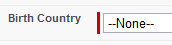
So, for consistency of developing a Visualforce page that has a consistent look-and-feel, I came up with a
Here's the code:
With the desired apex:pageBlockSectionItem elements marked, this code adds the red bar to compliment a Visualforce input element that has the
As mentioned in the discussion thread, Salesforce may at any time change the way they render required fields. Since this was only tested in Winter '12, the hack may not work in a later release if applied as-is. However, the concept should still hold true, and as long as the function is modified appropriately all should be well.
Note: This hack uses the jQuery library for selecting marked elements.
All I wanted was for ...

... to look like ...

So, for consistency of developing a Visualforce page that has a consistent look-and-feel, I came up with a
script snippet that seems to work to add the red bar to any apex:pageBlockSectionItem with the dataStyleClass set to "requiredData".Here's the code:
/**
 * Add the Salesforce "required" appearance to an
 * input cell.
 *
 * @param td The input cell to give a "required"
 *           appearance.
 */
function addRequiredAppearance(td) {

    // Construct the wrapper div that goes inside
    // the td.

    var requiredInputDiv =
            document.createElement("div");

    requiredInputDiv.setAttribute(
            "class", "requiredInput");

    // Construct and append the div that renders
    // as the red bar.

    var requiredBlockDiv =
            document.createElement("div");

    requiredBlockDiv.setAttribute(
            "class", "requiredBlock");

    requiredInputDiv.appendChild(
            requiredBlockDiv);

    // Move each child from the td inside the
    // wrapper div.

    while (td.firstChild) {
        requiredInputDiv.appendChild(
                td.removeChild(td.firstChild));
    }   // while (td.firstChild)

    // Append the wrapper div inside the td.

    td.appendChild(requiredInputDiv);
}   // function addRequiredAppearance(td)

// Iterate through every marked element to add
// the required appearance.

jQuery(".requiredData").each(function (i) {
    addRequiredAppearance(this);
});
With the desired apex:pageBlockSectionItem elements marked, this code adds the red bar to compliment a Visualforce input element that has the
required attribute set to "true".As mentioned in the discussion thread, Salesforce may at any time change the way they render required fields. Since this was only tested in Winter '12, the hack may not work in a later release if applied as-is. However, the concept should still hold true, and as long as the function is modified appropriately all should be well.
Note: This hack uses the jQuery library for selecting marked elements.
Monday, October 24, 2011
Project HardBoil: Day 4.5
Succeess! Without registering the app with Google, HardBoil now works with any Google Account using the AuthSub library for Google Data.
Basically, a user can login, pick a spreadsheet and boil the spreadsheet into code right on the spot. With the right amount of documentation and UI cleanup, I think this could be available for beta testing soon...
Basically, a user can login, pick a spreadsheet and boil the spreadsheet into code right on the spot. With the right amount of documentation and UI cleanup, I think this could be available for beta testing soon...
Sunday, October 23, 2011
Project HardBoil: Day 4
What a milestone! 842 lines of Apex code generated to create test records for 8 different objects that have relationships between each other.
The back-end code definitely should be cleaned up and re-thought a little bit, but the concept is proved and now the only thing I need to make this available to the world for "beta testing" is to setup the Google authentication scheme.
I really wish that Google would simply make Spreadsheets accessible without having to login. Wouldn't that be so much easier?
The back-end code definitely should be cleaned up and re-thought a little bit, but the concept is proved and now the only thing I need to make this available to the world for "beta testing" is to setup the Google authentication scheme.
I really wish that Google would simply make Spreadsheets accessible without having to login. Wouldn't that be so much easier?
Project HardBoil: Day 3
I've finally gotten my PHP code to start boiling Apex. Simply enough, the code it generated right now just looks like:
Every related SObject class used by
private class TestRecordSet {
    private Map<Id, Compensation_Rate__c> compensationRateMap;
    private Map<Id, Account> accountMap;
    private Map<Id, License_Certification__c> licenseCertificationMap;
    private Map<Id, Term__c> termMap;
    private Map<Id, Part_of_Term__c> partofTermMap;
    private Map<Id, Part_of_Term_Paydate__c> partofTermPaydateMap;
    private Map<Id, Course__c> courseMap;
    private Map<Id, Class__c> classMap;
}   // private class TestRecordSet
Every related SObject class used by
HardBoiler will need to have methods that generate the appropriate code for the appropriate location. For example: SObject instances have a boilApexVariableCode method, a boilApexConstructorCode method and a boilApexGetterCode method.
Friday, October 21, 2011
Project HardBoil: Day 2
As I began writing my code today, I realized that there was a problem with the way I designed the related objects.
My improved scheme includes the following:
I also took the easy way out with getting the spreadsheet to be read in the way I expected by duplicating the field name row and adding two more "column header rows" to represent the
My improved scheme includes the following:
SObjectSObjectFieldSObjectRecordSObjectRecordFieldValue
I also took the easy way out with getting the spreadsheet to be read in the way I expected by duplicating the field name row and adding two more "column header rows" to represent the
SOAPType and whether the field is a custom external ID or not.
Subscribe to:
Posts (Atom)